Back set-off will appear on back side of the job for designs having heavy patch.
KristaPrint provides its products and services exclusive to Printers and Designers.
It is necessary to fill the Online Registration form which is available in our Website. Mobile and Email ID associated with your account can’t be changed at any cost.
Printers must advise their registered Mobile number while communicating with KristaPrint.
Upon booking, Order No. is informed to the Printer by SMS and Email. Due to technical reasons sometimes SMS may not reach the Printer. Any instructions related to design corrections will not be accepted.
Synthetic Sheet is a paper, it is not water-proof. Upon scratching ink on this paper will come off.
Standard Papers / Boards will be used for all other paper Medias mentioned in our product list. All papers / boards of different mills will be used as per their availability, hence variation in brightness, pattern / texture and thickness may appear.
Printers must advise their registered Mobile number while communicating with KristaPrint.
Upon booking, Order No. is informed to the Printer by SMS and Email. Due to technical reasons sometimes SMS may not reach the Printer. Any instructions related to design corrections will not be accepted.
The grain in paper comes from how the fibers of the paper are arranged. We try to consider the grain direction within the framework of print production. However, we cannot exclude slight cracking occurring at the fold.
. PDF is our preferred format. For pdf setting. JPEG provides good quality outcomes if the file is converted under certain specifications. Text and vector images appear less sharp compared to PDF file format.
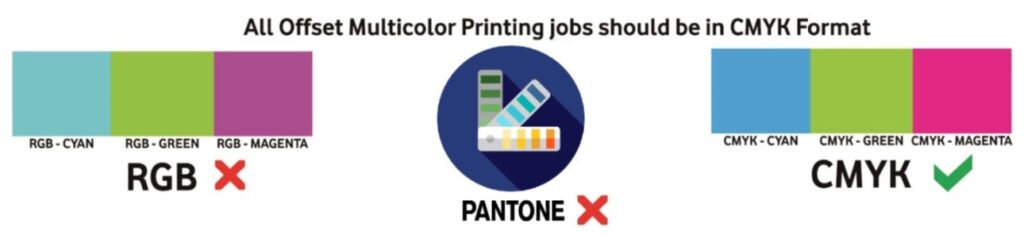
The working CMYK profile must be U.S. Web Coated (SWOP) v2. All colours in the design must be CMYK only. Do not use RGB and Panton Colours.
Design size should be as per final job size (90 x 53mm, 210 x 280mm, 420 x 280mm, etc). All-important matter in the design should be at least 4mm inside from all edges, so that important matter does not come under cutting. Provision for binding margin for jobs like Book wrapper, Bill Books, Receipts, etc. and extra space for Die-cut should be made within the final job size. All the time it is not guaranteed that the artwork will be placed near the Gripper even if it is requested. Design will not be edited by us. Job size should be from our standard product list only if not the price may vary.
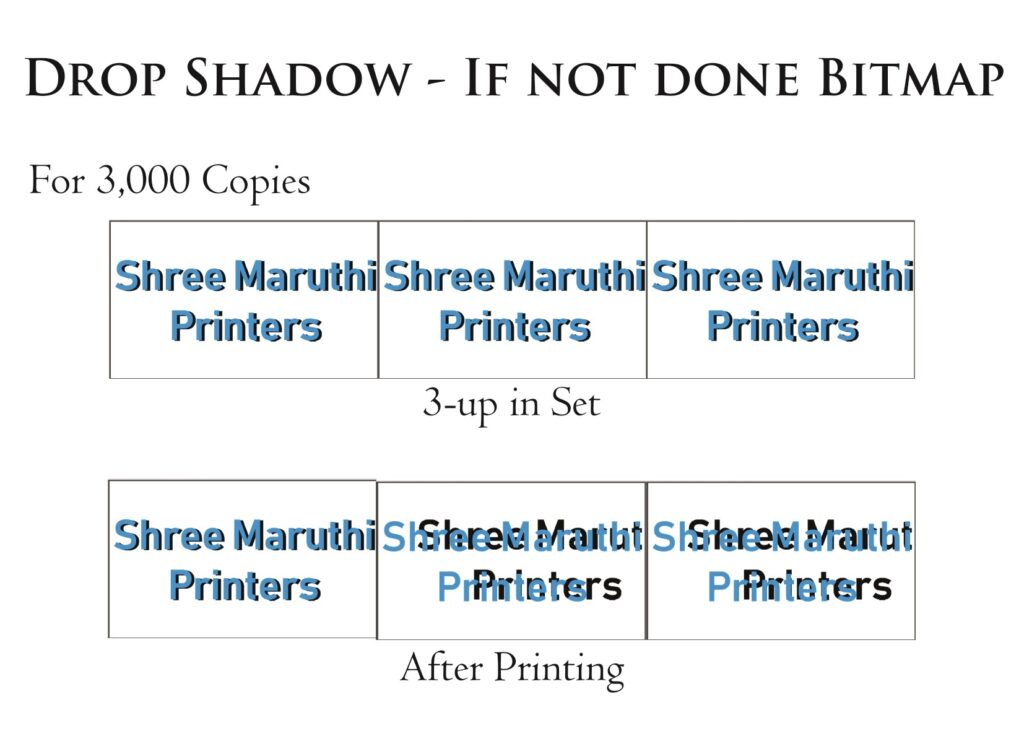
All Drop Shadow, Contour, Blend, Bevel effects should be ” break apart “, Convert all lens effect, Fountain Fill, Monochrome EPS, OLE object & images to 300 dpi CMYK bitmap.
For Copies more than 1,000 – first placement (up) in the set will not have any issue after printing. For 2-up, 3-up,….n-up the shadow will be shifted while ripping if Bitmap not done for Drop Shadow. This case is applicable for all Special effects.
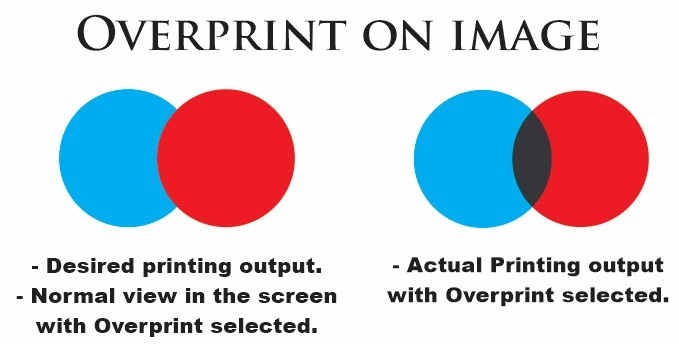
Do not set colours as “Overprint Fill”. Overprint is a way of combining colours when dealing with subtractive colour spaces such as CMYK. When you print non-transparent, overlapping colours, the top colour knock outs the area underneath. When used intentionally, overprint represents an additional way to create artwork that is visually interesting and distinctive. However, if overprint is turned on without your realising it, you will probably end up with prints that look significantly different from what you expected when designing them.
We shall not be held responsible for any Overprint setting in your artwork. Kindly do the self-check for any unwanted Overprint setting in your artwork.
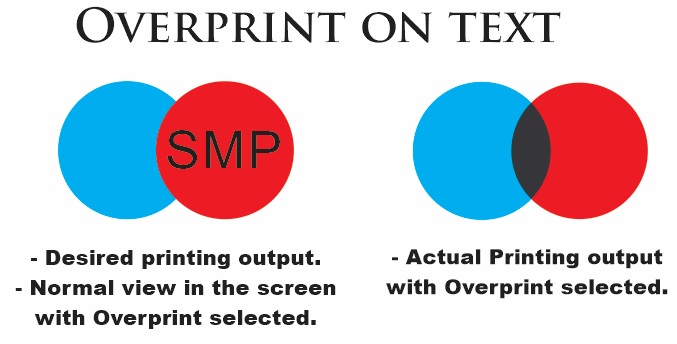
Following picture shows the text is in overprint, so it will be invisible in print.
Letters / texts colours must be formed by two colour combinations only. Here is an example of what can happen if you use all four colours:
You can create numerous great colours using different compositions of just 2 colours
For black colour letters / texts colour ratio must be C:0,M:0,Y:0 & K:100.
Preferably do not put heavy patches in the design. Due to this back set-off will appear.
Avoid any Dark colour tint designs and backgrounds in Special Cards (Corporate, Metallic and Textured Cards), you can’t expect the same colour output as in normal 300 GSM boards.
Maintain the total colour ratio less than 210% (Cyan+Magenta+Yellow+Black<210%) to avoid lamination issues.
For single-colour saturations, extremely light ink coverage (under 10%) may not even print at all. We recommend your colour choices, even your darkest sections, stay within the 150%-210% range. This area will show a lot of colour flexibility, while preventing the muddied look when colours approach 300% and above.
In order to make your tint/toning effect more obvious, make sure the value between colours are at least 15% of different.
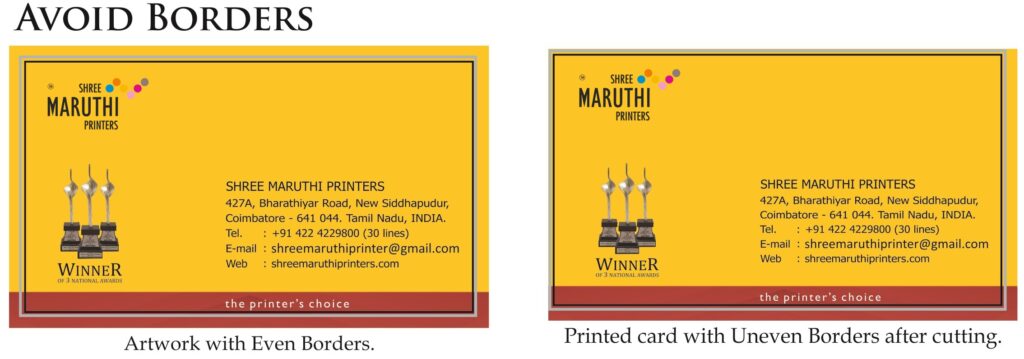
Do not set line weight less than 0.25pts. Avoid borders in the artwork, it is difficult to get even borders after cutting.
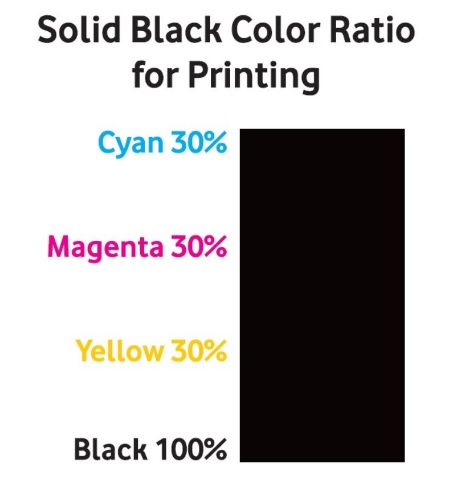
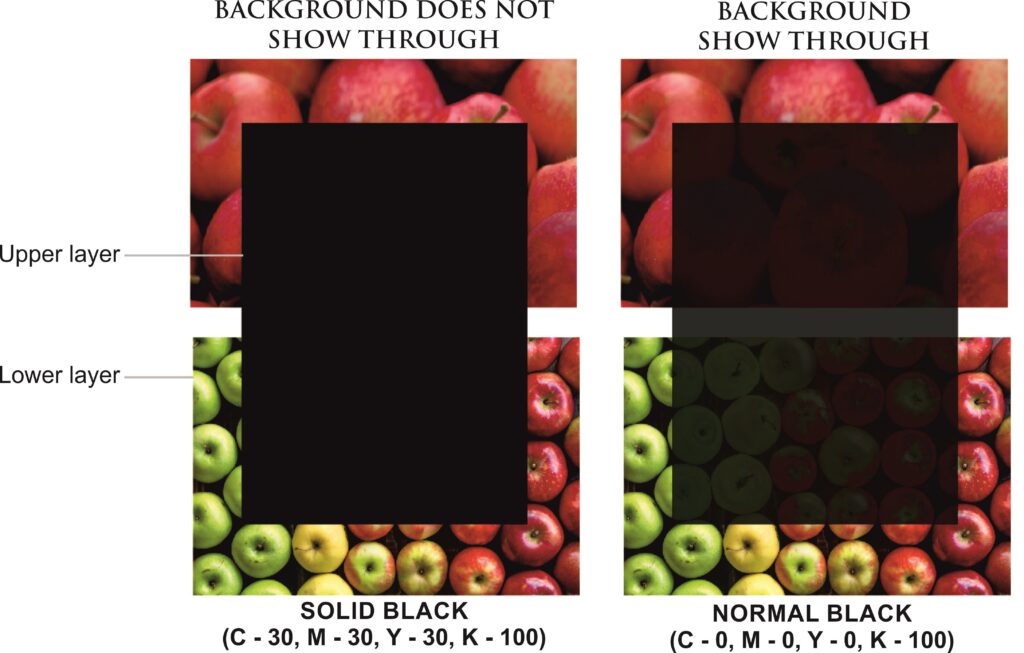
Standard black uses only black ink (100% K), whereas rich black contains elements of other colours (30% Cyan, 30% Magenta, 30% Yellow) either.
This will make the black denser onto an image if you want your background not to show through.
Designer will be solely responsible for rejection of job due to design errors or effects. No complaint in this matter will be accepted.
After Designing keep the size of the artwork at 100% in your software or adjust the size of the artwork design in the computer screen as it match the size of the printed job / card. If the Letters are blur even in the computer screen at this percentage, increase the font size in the design for legibility. Letters with the dark background (more than one colour combination outside the letters) must be large enough to avoid penetration of ink from the combination of colours in the dark background.
For Front and Back job and Folding job printers are requested to view the Guide. If there is any mistake in upload method KristaPrint will not be responsible for the same.
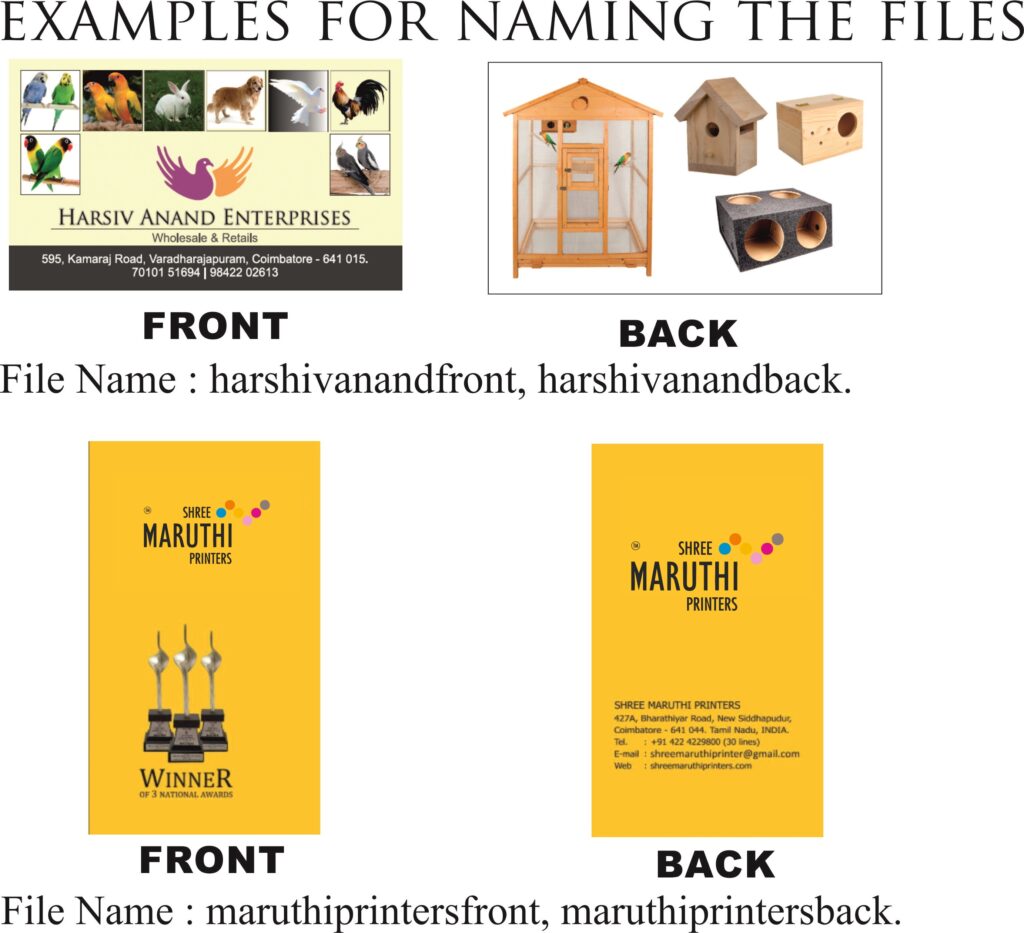
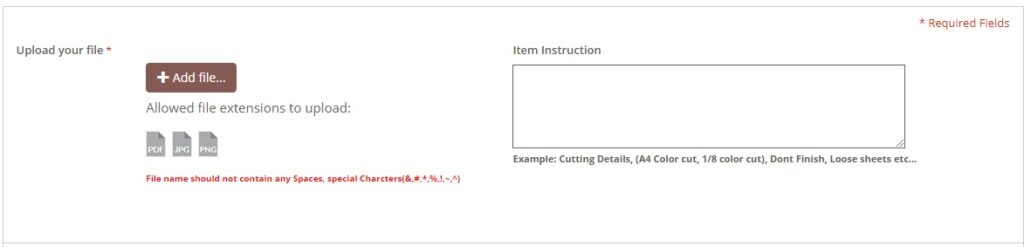
Upload file name should not contain any spaces and special characters (!,@,#,$,%,^,&,*,\,-,_,+,?,/). Upload file name should not be a common name (eg: 1, 2, 3, etc., Front, Back). Use name on the card / job followed by front, back, UV, goldfoil, premiumUV, etc.. as your file name, this will help you to differentiate your set of files from other set of files to avoid file replacements. When you click Add file and upload a file, the file will be compressed and will be shown as preview at once. Only after placing the orders the Original files will be received for Set Making. So, we cant compare the preview image and the file we received for printing in the file name issue scenario.
Correct file naming format example: masparesfront, masparesback, masparesUVfile, maruthifront, maruthiback, maruthiUVfile, maruthigoldfoilfile.
As the jobs are printed in Gang Printing, 100% colour matching is not possible and there will be 30% of the colour variation when compared to the submitted file. If the customer needs the exact colour, the job will be taken as an individual job and the cost will differ from the price shown in our website. The designs that we see in the Computer Screens are in RGB and the job we print is in CMYK, there will also be a slight colour change because of the difference of these colour standards and technologies. Colour shade and printing changes as per Paper. This cannot be emphasised enough that Colour is not guaranteed and may differ each run. By placing an orders with us you agree to this limitation. Under no circumstances will a reprint be honored for colour variations that have occurred during the printing process.
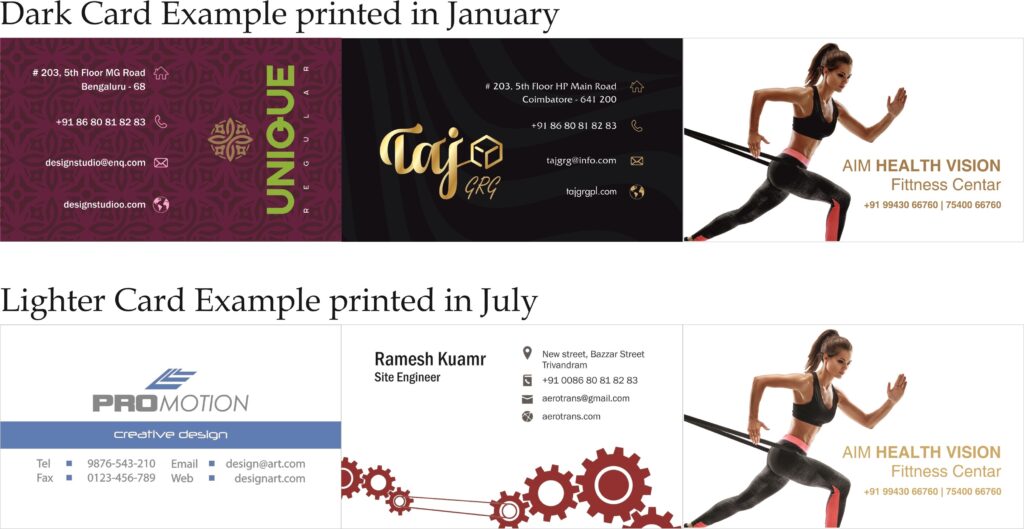
Colour and printing may not match in repeat jobs.The two main goals in gang run printing are substantial cost savings and pleasant colour matching. Our press operators balance the colours on all jobs so everyone has a 95%-98% colour consistency. Below you can see the results of having all dark cards on a run versus having light cards. The dark cards may darken your card’s image slightly whereas the light images may lighten the image. As you will see in the example of the Fitness Centre card below, the skin tone as card card-body as the colour may shift from run to run.
Since the ganging of jobs is an automated process we cannot change the card order for special requests. If colour matching is critical to your order, we do not recommend gang run printing. A custom run of only your order will give our press operators the control needed to match your colours exactly.
In front-back job, if there is same colour on both the sides, print and colour variation will appear.
Digital Print and Offset Print the colours are non-comparable.
Colour variation will appear in dark shades of Grey, Violet, Blue, Green, Brown, and Orange.
Back set-off will appear on back side of the job for designs having heavy patch.
Spot UV and Gold Foil cannot be done to text smaller than 16 point Bold, Screen Half tone as well as line drawing. Avoid Spot UV and Gold Foil for font type with a sharp end edge (eg: Serif font) and small logos which contain wording. Make sure that line thickness in not less than 0.5pts for Spot UV and Gold Foil. Please note that the items in the design which are not possible / difficult for screen printing will be eliminated without the concern of the customer.
Spot UV and Gold Foil is not preferred to be at the edges of the visiting card. Cutting will damage the UV coat and foil at the edges.
There could be difference of 0.25 to 0.75 mm in the registration of Spot UV.
Maintain the total colour ratio less than 210% (Cyan+Magenta+Yellow+Black<210%), if not ink won’t be dried soon and lamination problem exists in such case.
Final job size may be – 3-4 mm as compared to the ordered size. Rarely cutting of a job may be slightly cross.
If there is borders it is difficult to see even borders after cutting.
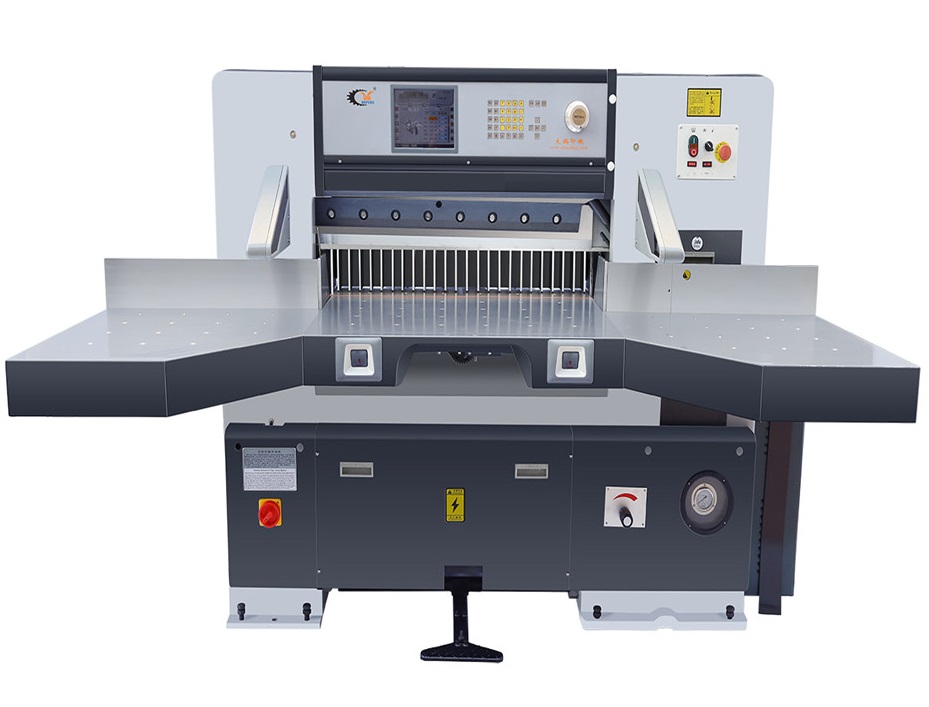
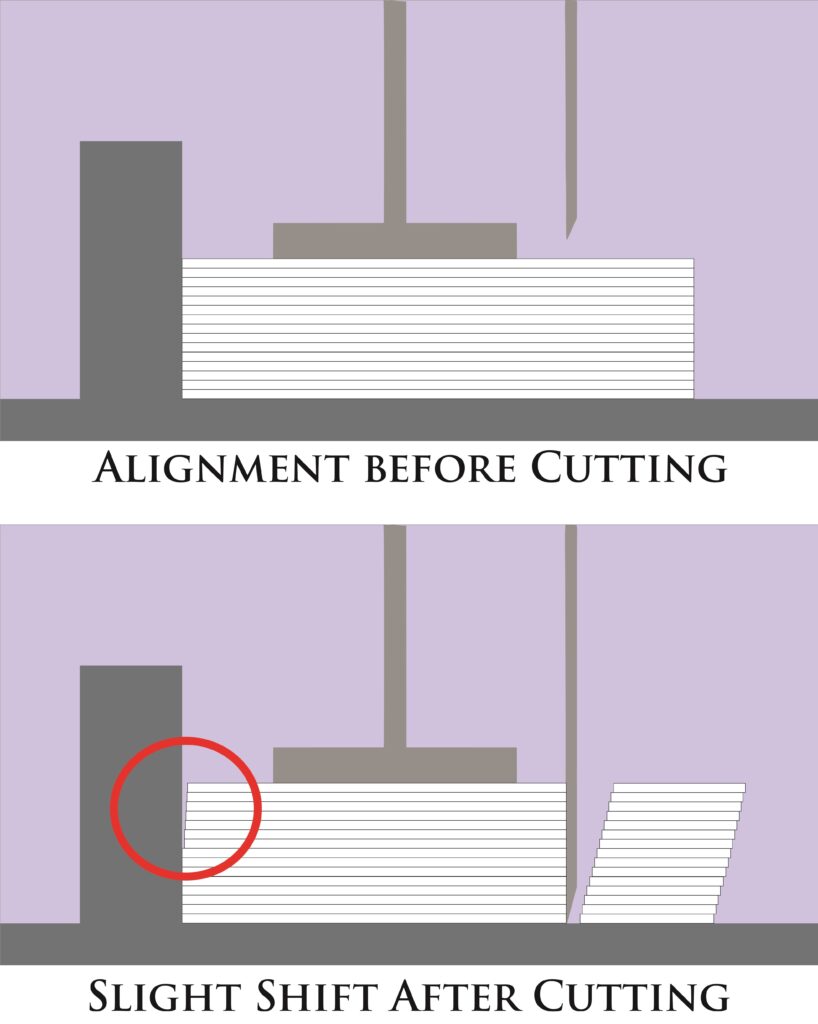
To speed the printing process we use a machine like this to cut many sheets at the same time. During the process the sheets may shift so it’s very common that any border designed too close to the cutting line will look uneven in the printed product.
During the cutting process there is a 1-2mm margin of error (due to characteristics of the stock, pressure placed on the product when being cut, as well as outside factors that may affect the printing process such as weather, humidity etc.), KristaPrint does not guarantee 100% center cuts. Please keep this in mind when creating your design.
Cutting Edge Tolerance: + – 1mm.
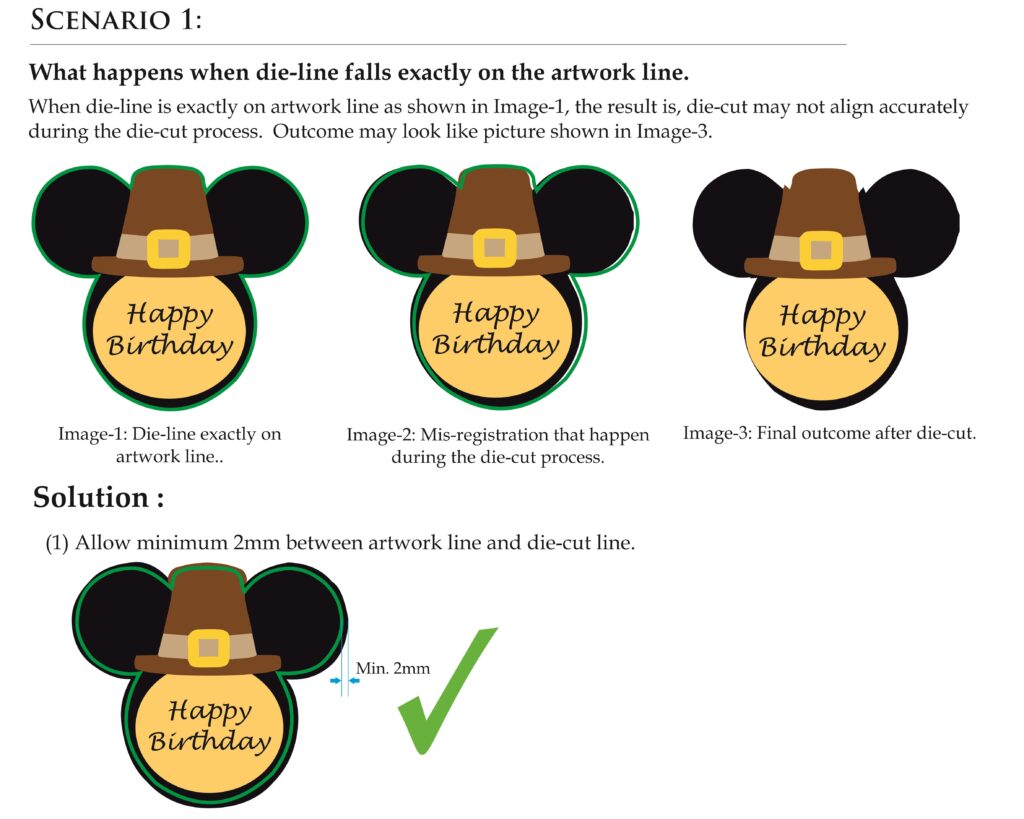
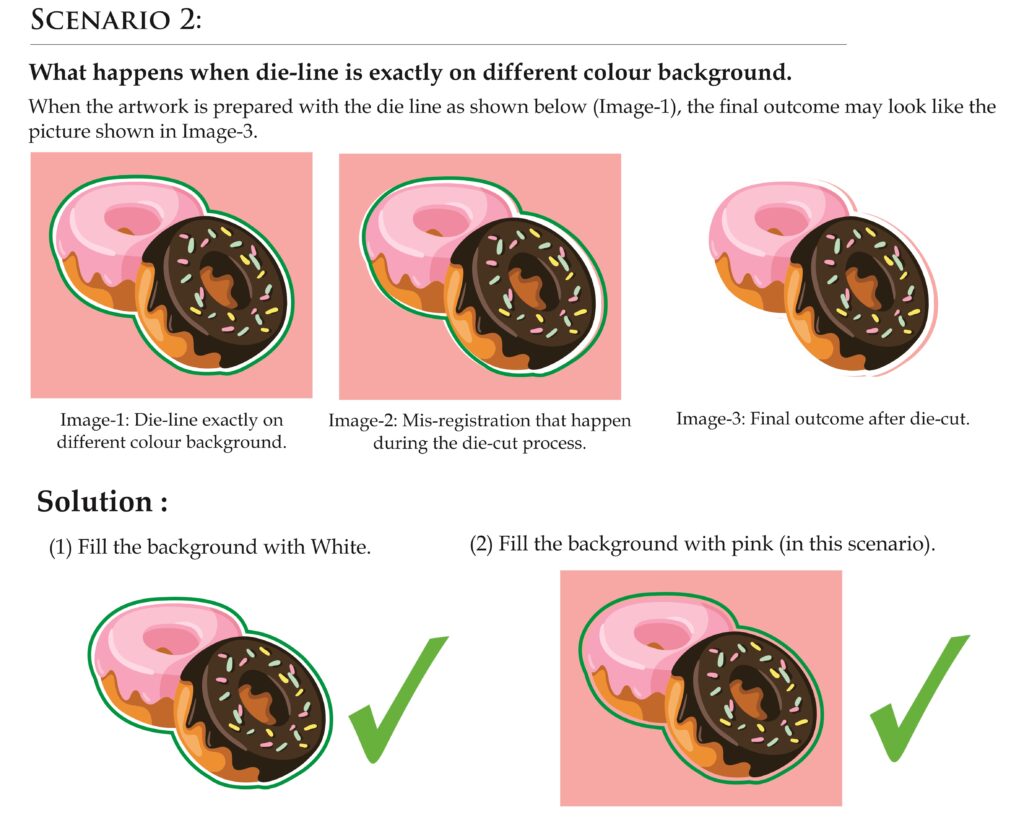
Below are mis-registration scenario that can happen during die-cut process when die line is not correctly placed, as + – 1mm cutting edge tolerance has to be taken into consideration.
NOTE: Customers are advised to revise artwork when these problems are detected. KristaPrint shall not be held liable for any of defect in printing outcome due to artwork sent not correctly prepared as advised.
Customers can advise us only for the Cutting detail, Maintaining the file size, Transport Details (Transport service you prefer and Place) and Extra Operation in the Item Instruction space available in the Order page.
Cutting detail terms that can be used in Item Instruction: A4 Size cut, 210 x 297 colour cut, Don’t finish, Cut into 2(n) pieces, Follow Cutting marks, etc.
If the job size is less than the specified size in the Product and if it has to be printed with same size, customer can use the term “maintain the file size”.
Jobs with Extra Operation(s) can be mentioned as Creasing, Folding, Die-cutting, Lamination, etc. in the Item Instruction where the files are uploaded. Extra Operations can be choosed as a product from the Product Category and can be Added to cart for the Payment.
There could be wastage up to 3% of the ordered quantity. Customer may get 970 instead of 1000, Similarly 485 instead of 500.
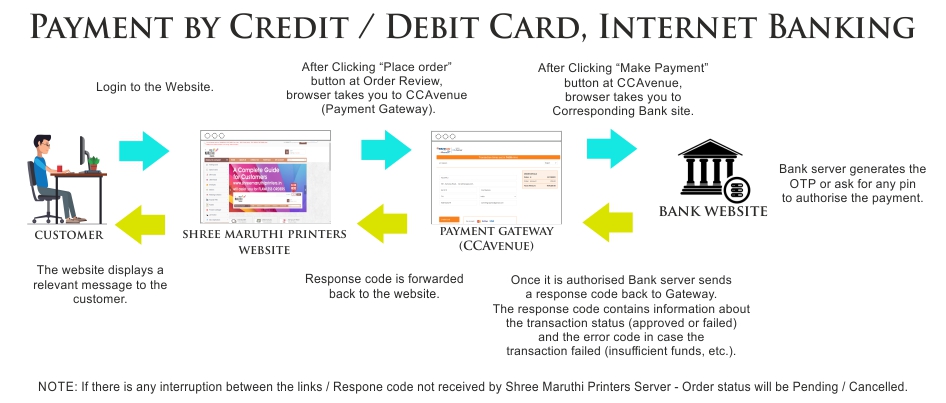
If the order status is cancelled / pending that particular order will not be taken by us even the Amount is debited from the account initially. In such case customer can wait for 15-20 min and check for any change in the status i.e. Ready to Batch this will happen only if Payment Gateway has authorised the Payment. If the status is still cancelled / pending even after the wait time, customer can place the order again if it is urgent or need to wait till we receive the record of that order from Billdesk (Payment Gateway). This may take 2-4 days for us to receive the record for cancelled / pending orders. If the Record for the Cancelled / pending order is received it will be reversed to the customer bank account or will be added to the wallet as per the customer’s convenience.
24 Hours make one working day. Sunday and other holidays are not considered as working days.
On the date of Delivery, Parcels will be handed over to the Transporter / Courier after 7 pm from our Coimbatore Office. Due to some unavoidable circumstances and technical reasons rarely delivery time may change. Parcel will be well packed by us. In rare cases there may be delay / mistakes / damage of the parcel from the transporter / courier in delivering the goods. Company will not be responsible for it. Courier can be tracked in the Courier Company Website.
Product List and Rates may change any time without prior intimation. Effort will be made to inform everybody. Company reserves right to amend Product List and Rates anytime.
Printer placing order will be solely responsible for all the matter, text and images in the job given for printing. kristaprint will not be responsible for it.
Kristaprint reserves right to refuse any order without giving any reason.
Customers are requested to follow all the instructions given in Online Guide and Resource Center. kristaprint shall not be held liable for any of defect in printing outcome due to artwork sent not correctly prepared as per the advises and Instructions given in Online Guide and Resource Center, Customer are requested not to claim for any Reprint / Refund for the same.
Cancelled orders amount will be Refund to wallet only.
If there is any defect in any job / card, amount will be refunded only for the quantity having defect. If Customer needs reprint in such case, defect quantity must be near to the minimum printed quantity of that product. For Example if customer placed any order in Gloss Front and Back 1000 copies, if the defect quantity is 250 – amount for 250 nos will be refund to wallet / if customer needs Reprint for 250 copies, it can be printed is Gloss Front and Back 500 copies. Balance 250 copies charge must be paid by the Customers.
Note: Only few products have 500 as minimum quantity.
If there is any issue in the printed job / card, complaint must be raised within 3-4 working days from the date of order received. If cards / job not received within the usual delivery time Customer can raise a complaint in the Dispatch Department.
What is Common Customer errors?
Customer errors include incorrect file submission in accordance with our specifications, duplicate orders, customer misunderstandings of Delivery time, slight colour variances within four-colour (CMYK) industry standards for pleasing colour and designs not within stated cutting and folding tolerances.
Kristaprint cannot and does not check any submission for spelling, grammar or any other textual errors. The design will be printed as it appears in the file. It is the sole responsibility of the customer to ensure that all materials submitted for printing are formatted correctly and free of spelling or grammatical errors.
Kristaprint does not recommend designs with borders due to the nature of our cutting. We cannot guarantee the bordered design will be perfectly centered after cut.
No compensation is offered for any of the above listed customer errors or for the below items:
Apart from these things, customer must take care of all other technical aspects in the design for flawless orders.
Job will be packed as per the availability of packing material.